

How to backup contacts and sms messages from Samsung Galaxy Note LTE (GT-N7005)
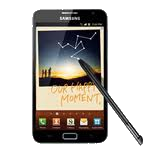
PhoneCopy.com is a web service which is free for personal purposes (with few limitations). This tutorial will show you how to backup your data from Samsung Galaxy Note LTE (GT-N7005). The whole process can be completed in few minutes.
Download PhoneCopy for Android to your Android phone, which you can download free of charge. After downloading and installation, go through following steps.
Backup contacts and SMS from your Android
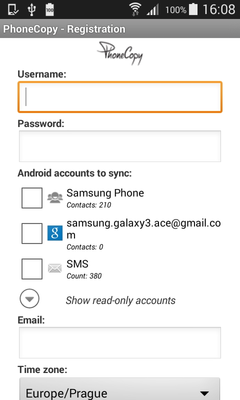
Run the app and create new account. You can check which contact databases you want to backup and synchronize. You can do multiple choice.
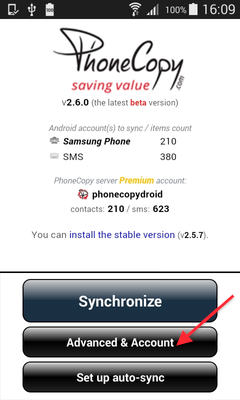
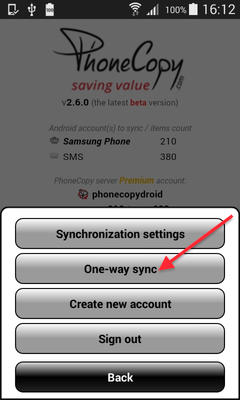
After successful login, press "Advanced & Account". Select "One-way sync" and after choose "This device >> server".
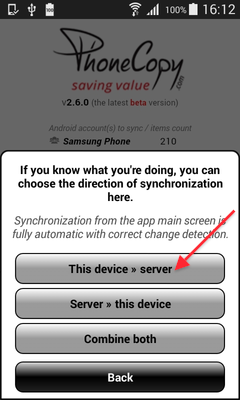
Contacts from your Android phone will be copied to PhoneCopy.com server in few seconds.
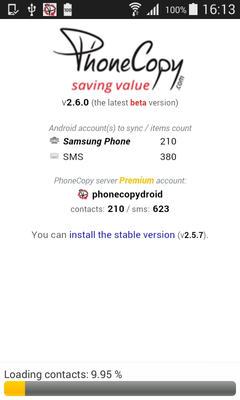
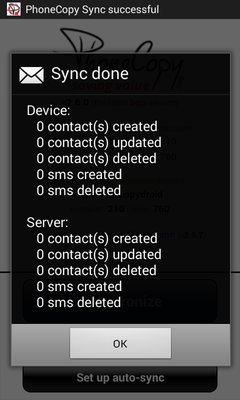
That is all there is to it. Your contacts are now backed up on PhoneCopy and you can access them from any browser whenever you need them.
Some additional tips:
If the sync does not complete, make sure your phone has a stable internet connection and that background data is enabled for the PhoneCopy app. A brief pause and retry usually resolves the issue.