

How to backup contacts and sms messages from OPPO R1K R8001
PhoneCopy.com makes it simple to back up your contacts from OPPO R1K R8001 to the cloud. In this guide, we will walk you through the entire process step by step.
Download PhoneCopy for Android to your Android phone, which you can download free of charge. After downloading and installation, go through following steps.
Backup contacts and SMS from your Android
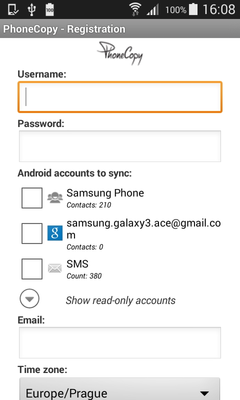
Run the app and create new account. You can check which contact databases you want to backup and synchronize. You can do multiple choice.
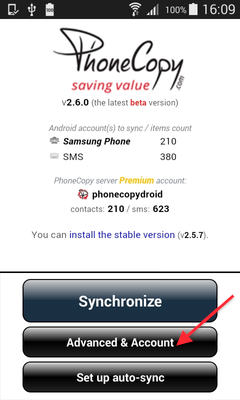
After successful login, press "Advanced & Account". Select "One-way sync" and after choose "This device >> server".
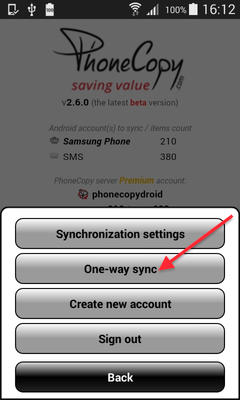
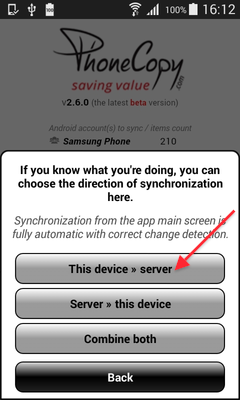
Contacts from your Android phone will be copied to PhoneCopy.com server in few seconds.
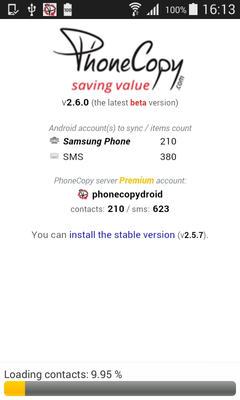
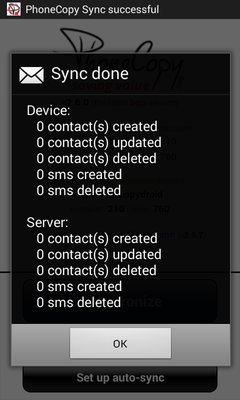
Your data is now safe on PhoneCopy. The service stores a full copy of your contacts online, so you can access them from any device or restore them whenever needed.
Some additional tips:
Contacts can be then transferred to another device (eq. iPhone, other Nokia, SonyEricsson, Samsung, LG etc). You can always edit your contacts in your online account. Also, you will see full history of your contacts, as well as the data that you have deleted between two synchronizations.