

How to backup contacts and sms messages from NEC Terrain (NE201A1A)
In this tutorial, we show you how to use PhoneCopy.com to safely back up the contacts stored on your NEC Terrain (NE201A1A). The service is free for personal use and works directly from your phone.
Download PhoneCopy for Android to your Android phone, which you can download free of charge. After downloading and installation, go through following steps.
Backup contacts and SMS from your Android
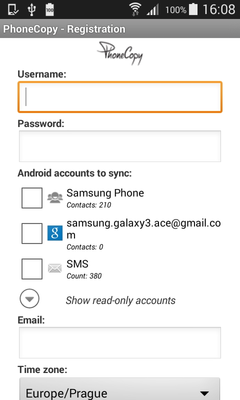
Run the app and create new account. You can check which contact databases you want to backup and synchronize. You can do multiple choice.
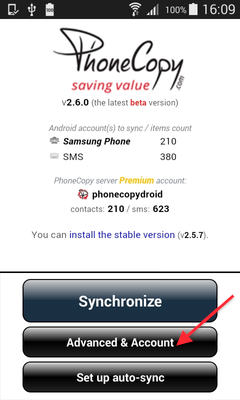
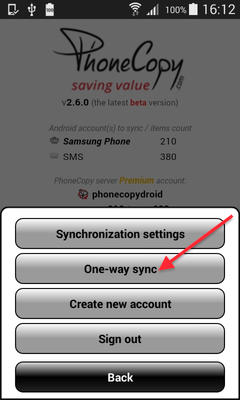
After successful login, press "Advanced & Account". Select "One-way sync" and after choose "This device >> server".
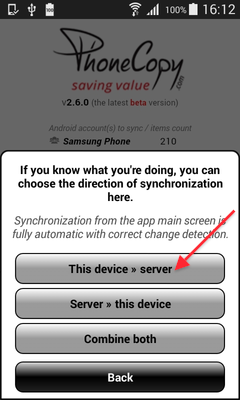
Contacts from your Android phone will be copied to PhoneCopy.com server in few seconds.
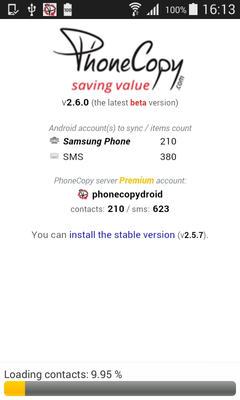
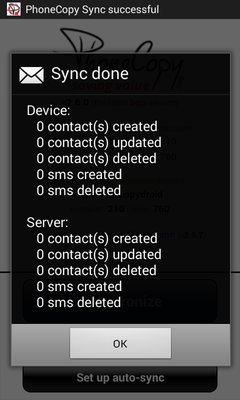
With your contacts safely backed up, you can rest easy knowing your data is secure. Log into your PhoneCopy account at any time to view, edit, or restore your contacts.
Some additional tips:
The free PhoneCopy plan allows you to store up to 500 contacts, which is more than enough for most users. A premium plan is available if you need to sync more data or use advanced features.