

Couldn't find your phone? Have a question? Contact us
How to backup contacts from Geeksphone Revolution
Whether you are switching phones or just want a safe copy of your data, PhoneCopy.com is a great solution. This guide covers how to back up contacts from your Geeksphone Revolution quickly and easily.
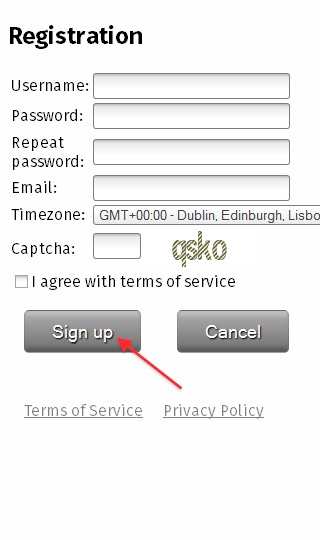
Download the PhoneCopy application from Firefox Marketplace. If you do not have a PhoneCopy account yet, press "Register new account" and create it by filling in "Registration" and then press "Sign up".
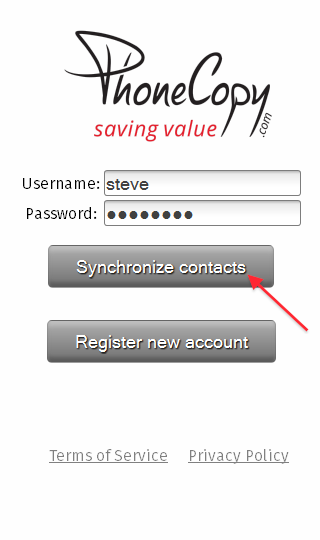
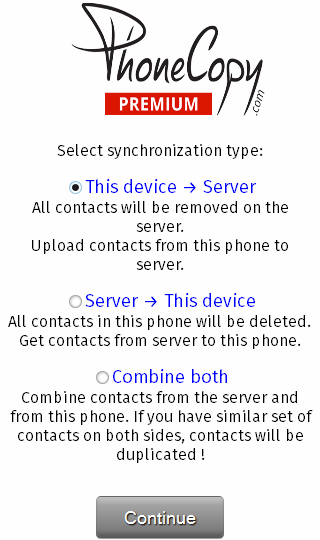
If you already have a PhoneCopy account, fill in your username and password. To export your contacts, press "Synchronize". Select synchronization direction.
With your contacts safely backed up, you can rest easy knowing your data is secure. Log into your PhoneCopy account at any time to view, edit, or restore your contacts.
Some additional tips:
PhoneCopy also supports syncing notes, calendar events, and SMS messages on many devices, not just contacts. Check the PhoneCopy website to see the full list of supported data types for your phone.