

How to backup contacts and sms messages from Enspert Identity Tab E201

Whether you are switching phones or just want a safe copy of your data, PhoneCopy.com is a great solution. This guide covers how to back up contacts from your Enspert Identity Tab E201 quickly and easily.
Download PhoneCopy for Android to your Android phone, which you can download free of charge. After downloading and installation, go through following steps.
Backup contacts and SMS from your Android
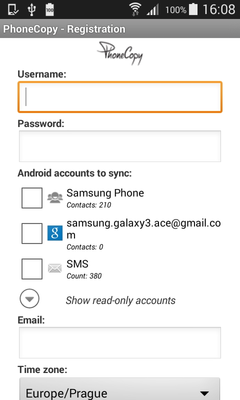
Run the app and create new account. You can check which contact databases you want to backup and synchronize. You can do multiple choice.
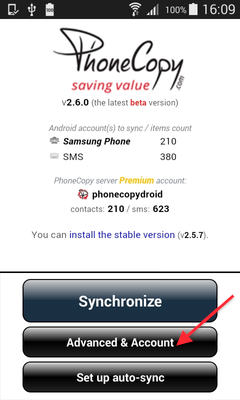
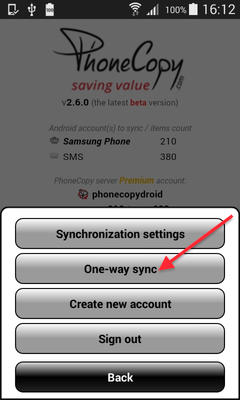
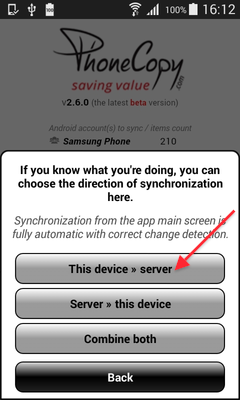
After successful login, press "Advanced & Account". Select "One-way sync" and after choose "This device >> server".
Contacts from your Android phone will be copied to PhoneCopy.com server in few seconds.
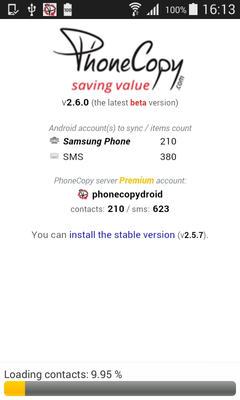
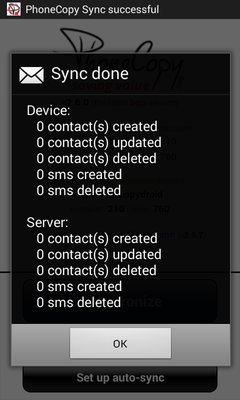
Your backup is now complete. Visit the PhoneCopy website to confirm that all your contacts were transferred correctly and to explore the other features your account offers.
Some additional tips:
On your online account, you will see full history of your contacts, as well as the data that you've deleted in between the synchronizations. You can find them in an archive from where you can restore them. And if this is still not enough of a backup for you, you can download a CSV file, that you can store in your computer.